WELCOME TO THE HALLOWED HISTORY PROTOTYPE
USING THE PROTOTYPE
CREATE A VIRTUAL CEMETERY
The Virtual Cemetery contains 30 real veterans from 5 allied nations. It is designed to work from the comfort of home.
Because the system thinks it's a real cemetery all of the features you will find in a real cemetery appear. The only difference is there are no real graves to go to.
Instead, the same selectable flags that will sit over real graves in real cemeteries also appear in the
Virtual Cemetery. They represent the veteran graves.

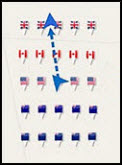
So wherever you are in the world and whenever you create a Virtual Cemetery it will be created around your position. If you’re at home you will find the Virtual Cemetery dropped around or close to your house, with your compass arrow indicating your position.
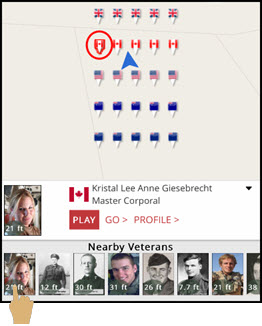
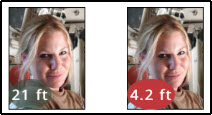
The compass arrow and range counters will indicate your position and distance to those virtual veteran graves.

You will also find a photo gallery of veterans geolocated nearby. You can tap the photos and flags to access
their histories.

Just like in a real cemetery, real families have honored their loved ones.
People like Theodore Roosevelt IV speaks for his grandfather. Shannon Shepley speaks for her lost sister and ten year old Jaden Grant speaks for his fallen Dad - to name just a few.
So please, create a Virtual Cemetery, play the videos, read the histories and see how the system will work in a real cemetery.
To Create a Virtual Cemetery
- Tap the 'Virtual Cemetery' button in the Home Screen.

- Tap the 'Create a Virtual Cemetery' button.

EXPLORE NORMANDY U.S. CEMETERY
To prove the system can cover thousands of graves, every one of Normandy Cemetery's 9387 graves is marked with a geolocated flag. Each flag can be tapped to access a basic profile about the veteran lying there.
To Explore Normandy Cemetery
There are two ways to get there:-
Access Normady Cemetery using Theodore Roosevelt's (TR Jr's) Veteran Profile
- Tap the Featured Profiles button in the Home Screen.

- Tap TR Jr's picture in the 'Today's Veteran' panel.

-
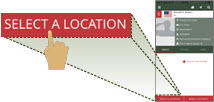
Tap the 'Select A Location' button at the bottom of TR Jr's Veteran Profile.
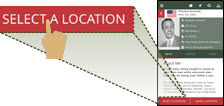
-
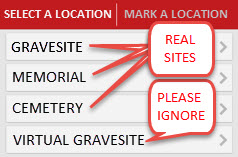
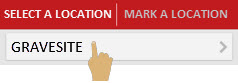
Tap the Gravesite button.
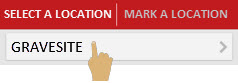
Result: A satellite image of Normandy Cemetery will open with TR Jr's grave flag highlighted in red, surrounded by the flags of his comrades.
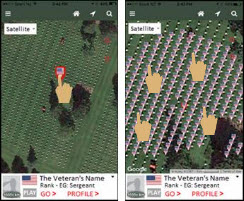
Gently swipe your way around Normandy Cemetery, tapping any flag to open a profile snippet about any veteran and access their basic profile.
- Tap the Featured Profiles button in the Home Screen.
-
You can also get to Normandy Cemetery by:
- Tapping the Search button in the top tool bar.

- Entering 'Normandy' into the 'Other Keywords' field

- Tapping the Search Button.

- Tapping any Veteran Search snippet to open their basic Veteran Profile.

- Tapping the 'Select A Location' button at the bottom of the Veteran's Profile.
- Tapping the Gravesite button.
- Tapping the Search button in the top tool bar.
FIND VETERANS AND GO TO THEIR CEMETERIES AND MEMORIALS
Our database contains nearly 2 million veterans, with the ability to add millions more - regardless of when they died or served.
Every veteran has a basic profile, waiting for someone like you to upload a history about them.
Almost every cemetery or memorial where those millions are buried or commemorated is geolocated, enabling you to view over 24,000 sacred sites from home.
To find a veteran and go to their cemetery or memorial:
- Tap the Search button in the top tool bar.

- Enter the Veteran's first and second name, e.g. John Smith.

- Enter and select any other details, like Nationality to narrow your search.

- Tap the Search button.

- Tap the veteran's search snippet to open their basic profile.

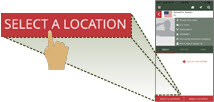
- Tap the 'Select A Location' button at the bottom of the Veteran's Profile.
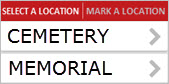
- Tap either the Cemetery or Memorial button.
SEE WHAT OUR SUPPORTERS SAY
Hallowed History is backed by many renown veterans and Gold Star family supporters.
Tap the Supporter and Education icon on the top toolbar to see their messages and videos.

WATCH OUR EDUCATION VIDEO
Hallowed History is designed to educate our kids about service, sacrifice and modern technology. It will also help to fund raise for our schools.
To see how, tap the Supporter and Education icon, tap the Education Program link and play the video.



REVIEW THE 'YOUR VETERAN' HISTORY
Open and review a typical 'Your Veteran' history in the Featured Profiles screen.